

Most academy owners start the same way. A Google Form for registrations. A WhatsApp group for parent communication. A spreadsheet to track who paid and who didn't. Maybe Jotform if you wanted something slightly more polished than Google Forms.
It works - until it doesn't. And the breaking point usually isn't dramatic. It's the slow accumulation of missed follow-ups, lost leads, double-booked classes, and late-night spreadsheet wrangling that quietly eats into the time you should be spending on what actually matters: teaching.
If you're running a dance studio, swim school, martial arts academy, music school, or any class-based business with more than 20-30 students, there's a good chance your current setup is costing you more than you realize - in time, in revenue, and in students who slipped away because nobody followed up.
This post breaks down exactly where the Google Forms + WhatsApp + Spreadsheet workflow falls apart, step by step, and what a purpose-built class management platform like Classcard does differently at each stage.
The 10-Step Academy Workflow: What Really Happens Behind the Scenes
Whether you're teaching ballet to 5-year-olds or jiu-jitsu to adults, every academy follows roughly the same operational flow. A potential student shows interest. You collect their details. You follow up. You offer a trial. You convert them to a paying student. You manage their classes, attendance, payments, and progress from that point forward.
The question isn't whether this workflow exists at your academy. It does. The question is whether you're running it manually across five or six disconnected tools, or whether it's automated in one place.
Let's walk through it.
The Manual Way: Google Forms + Jotform + WhatsApp + Spreadsheets
.png)
Step 1: A Lead Shows Interest
A parent messages you on WhatsApp or Instagram asking about classes. Maybe they found you on Google, maybe a friend referred them. Your staff responds manually, answering questions about class times, pricing, age groups, and eventually sends them a Google Form or Jotform link to fill out their details.
Where time is lost: Every inquiry gets a manual, individual response. During busy periods (start of term, back-to-school season), messages pile up and response times stretch from minutes to hours to days. Some inquiries never get responded to at all.
Step 2: The Form Gets Submitted
The parent fills out the form. Their data lands in Google Sheets or Jotform's response dashboard. Staff might get an email notification, or they might not notice until they check the spreadsheet manually.
Where things break: The data is now sitting in a tool that has no connection to your scheduling, billing, or communication systems. It's just raw data in a table. Nobody has been assigned to follow up. No deadline has been set. The clock is ticking.
Step 3: Manual Data Entry
Someone on your team copies the parent's details from the form response into your internal tracking spreadsheet - the one with tabs for "Leads," "Current Students," "Payments," and "Class Roster." Name, child's age, phone number, email, which class they're interested in.
Where things break: This is pure duplicate work. And it's where errors creep in - a misspelled email address, a wrong phone number, a child assigned to the wrong age group. You now have the same data in two places, and they'll inevitably drift out of sync.
Step 4: Follow-Up on WhatsApp
A staff member manually messages the parent on WhatsApp to confirm their interest and offer a trial class. If it's a busy week, this follow-up might happen 2-3 days after the inquiry, by which point the parent may have already reached out to a competitor who responded faster.
Where things break: There's no system reminding anyone to follow up. It depends entirely on a staff member remembering, checking the spreadsheet, or scrolling back through WhatsApp messages to find the inquiry. Research consistently shows that the probability of converting a lead drops dramatically after the first 24 hours. And yet most academies don't have a system to ensure follow-up happens within that window.
Step 5: Trial Class Scheduling
The parent wants to try a class. Staff manually checks the schedule - which lives in Google Calendar, another spreadsheet, or sometimes just in the instructor's head - and finds an available slot. Then it's back to WhatsApp to propose a time. The parent can't make that one. More back-and-forth. Eventually a time is agreed.
Where things break: This scheduling dance can take 3-5 messages over 1-2 days. Every extra message is a chance for the parent to lose interest or forget. Meanwhile, the staff member is doing all of this manually for every single inquiry.
Step 6: Trial Class Day
The trial student shows up. The instructor may or may not know they're a trial student (versus a regular student or a make-up). Attendance gets marked on paper, in an app, or in yet another spreadsheet. The trial goes well, the child loves it, the parent seems happy.
Where things break: No system automatically records that this lead attended a trial. No trigger is set to follow up. The outcome of the trial lives in the instructor's memory and maybe a quick WhatsApp message to the front desk.
Step 7: Post-Trial Follow-Up
This is where most academies lose most students. The trial went great, but nobody follows up the next day. Or the follow-up happens a week later, and by then the parent has enrolled their child elsewhere. Following up requires someone to remember - to check the spreadsheet, notice which trials happened recently, and manually send a WhatsApp message.
Where things break: There's no automated trigger. No task gets created. No deadline appears. It's 100% dependent on human memory and initiative. Studies on lead conversion across industries consistently show that speed of follow-up is the single strongest predictor of conversion. And yet this step is the most likely to be forgotten in a manual workflow.
Step 8: Enrollment
The parent decides to enroll. Now staff creates a new entry in the "Current Students" spreadsheet, copies data from the "Leads" tab (hopefully without errors), sends a payment link or collects cash, and manually records the transaction somewhere.
Where things break: The lead's data gets re-entered a second time. The connection between "this person was a lead who attended a trial on March 3rd" and "this person is now a student" exists only in someone's memory. There's no audit trail. No pipeline visibility.
Step 9: Class Assignment
Staff manually adds the student to the correct class roster. The instructor needs to be informed - another WhatsApp message. If the class is full, someone needs to check capacity, potentially offer an alternative time, and manage a waitlist (if one exists - it probably doesn't, formally).
Where things break: Class rosters, schedules, and capacity limits live in separate documents. There's no automatic check for availability. Overbooking happens. Instructors find out about new students when they walk through the door.
Step 10: Ongoing Management
From here forward, the academy manages this student across multiple disconnected systems. Attendance in one spreadsheet. Payments in another. Class schedules in a third. Communication on WhatsApp. Progress? Nobody's tracking it systematically. Make-up classes? "Just send me a message and we'll figure it out." Report cards? Manual. Invoices? Manual. Payment reminders? Manual.
The tools used: Google Forms or Jotform + Google Sheets + WhatsApp + Google Calendar + a payment app + maybe paper registers.
The result: 5-6 disconnected tools. Hours of manual admin per week. Leads falling through the cracks. No single source of truth. And a growing feeling that you're spending more time managing paperwork than running classes.

The Classcard Way: One Platform From First Inquiry to Successful classes
Now let's walk through the same 10 steps, but with everything connected.
Step 1: A Lead Shows Interest
The parent finds your Classcard online booking page, scans a QR code at your front desk, or you share your Classcard lead form link. The form is customizable with fields that are specific to academies - child's name, age, birthday, current school, school year, guardian info, emergency contacts, medical information, even an electronic signature field for waivers and a payment field for registration fees.
You can also embed this lead form directly on your website, so parents can register their interest without you having to manually send a link.
What's different: The parent isn't just filling out a generic form. They're entering your academy's system. Every piece of data they provide flows directly into their lead profile - no spreadsheets, no manual copying.
Step 2: Automatic Lead Profile Creation
The moment the form is submitted, Classcard automatically creates a lead profile with all the data the parent provided. Your team gets notified by email instantly. The lead appears in your pipeline with a stage (Enquired → Contacted → Email sent → Won) that everyone on the team can see. The lead stages can be customized too.
What's different: No one needs to check a spreadsheet. No data needs to be copied anywhere. The lead exists in the same system where you'll schedule their trial, track their attendance, convert them to a student, and manage their enrollment. It's one continuous flow.
Step 3: Team Collaboration (Not Copy-Paste)
Instead of copying data into a spreadsheet and hoping someone follows up, staff can add notes directly to the lead's profile. They can @mention a colleague ("@Sarah - this parent is interested in the Saturday swim class, can you follow up?"). They can set task reminders with specific dates and times ("Follow up with this parent on Thursday at 10am").
The lead's stage is visible to the whole team. Everyone knows where every lead is in the process - no need to ask around or check multiple spreadsheets.
What's different: The follow-up isn't dependent on human memory. It's structured, assigned, and visible. This is what a CRM does, and it's built directly into your class management system.
Step 4: Automated Follow-Up
Classcard's automation feature lets you set up triggers that fire automatically. When a new lead fills out the form, the system can automatically send a welcome email with class information, a trial booking link, or a personal note from the academy director. No one needs to manually type a WhatsApp message.
You can choose from ready-made automation templates or build your own custom workflows with specific triggers, filters, delays, and actions.
What's different: The first touchpoint happens instantly - within minutes of the inquiry, not hours or days. And it happens consistently for every single lead, whether you get 3 inquiries this week or 30.
Step 5: Trial Class Booking
The parent can book a trial class directly through your online booking page. They see available classes, select a time, and register. Or staff can enroll the lead into a trial from the lead's profile or from the class itself. You control which subjects offer trials, the trial price (free or paid), and the maximum number of trials a lead can book.
The trial automatically appears on the class calendar. The instructor knows exactly who's coming and that they're a trial student.
What's different: No back-and-forth on WhatsApp to find a time. No manual calendar checking. The parent books directly, the system handles the rest.
Step 6: Trial Class Day
The instructor marks attendance in the Classcard Staff App or the student checks in via the student portal (available as a Progressive Web App that parents can add to their home screen - no app store download needed). Class comments, feedback, and even photos can be shared directly from the class session. The lead's profile automatically logs that they attended the trial, when, and for which class.
What's different: There's a complete record of the trial - not just "they showed up" but when, which class, who taught it, and any feedback. This data feeds directly into the next step.
Step 7: Automated Post-Trial Follow-Up
This is where Classcard's automation makes the biggest difference. You can set up a workflow that automatically triggers after a trial is attended - send a feedback request email 2 hours after the class, create a follow-up task for a staff member the next morning, or send an enrollment offer 24 hours later with a direct link to sign up.
Classcard provides a ready-made automation template specifically for post-trial follow-up, so you don't need to build it from scratch.
What's different: No one needs to remember to follow up. The system handles it. Every trial student gets a timely, consistent follow-up, whether your team is having a quiet week or drowning in back-to-school registrations.
Step 8: Lead to Student Conversion
When the parent decides to enroll, staff simply changes the lead stage to "Won." Classcard automatically converts the lead into a student. All the data - contact info, guardian details, emergency contacts, medical notes, trial history - carries over. Nothing needs to be re-entered.
An invoice with a payment link can be generated and sent immediately. Classcard supports online payment integrations and also lets you manually record payment receipts. Memberships can be set up to automate recurring billing.
What's different: One click converts a lead to a student. Zero duplicate data entry. The student's full history, from first inquiry to enrollment, is preserved in one profile.
Step 9: Class Assignment
The student is enrolled in the correct class directly from their profile. The instructor sees them on the class register automatically. If the class is full, the student goes on the waitlist - no separate tracking needed. Classcard reconciles sessions attended with sessions purchased and will remind you when a student's package is nearing completion.
What's different: No separate roster spreadsheet. No WhatsApp message to the instructor. The system handles capacity, waitlists, and session tracking automatically.
Step 10: Ongoing Management
From this point forward, everything lives in one place. Attendance is tracked in the app. Payments are tracked in the same system. Schedules are managed on the same calendar. Communication goes through automated reminders, email alerts, and in-app messaging. Student progress is tracked with customizable grade scales and rubrics. Make-up classes have a dedicated workflow. Files, video links, and course materials can be shared directly with students.
Parents and students access everything through a branded Progressive Web App (included at no additional cost) - your academy's name, your branding, your custom domain. They can view schedules, make bookings, check progress, and manage their account without downloading anything from an app store.
And Classcard's AI features help you generate, modify, and refine class descriptions , so your online booking page always reads professionally without spending hours writing copy.
The tool used: Classcard (one platform).
The result: One system from first inquiry to successful classes. Automated follow-ups. Zero leads lost. Hours of admin eliminated every week. A single source of truth for your entire operation.

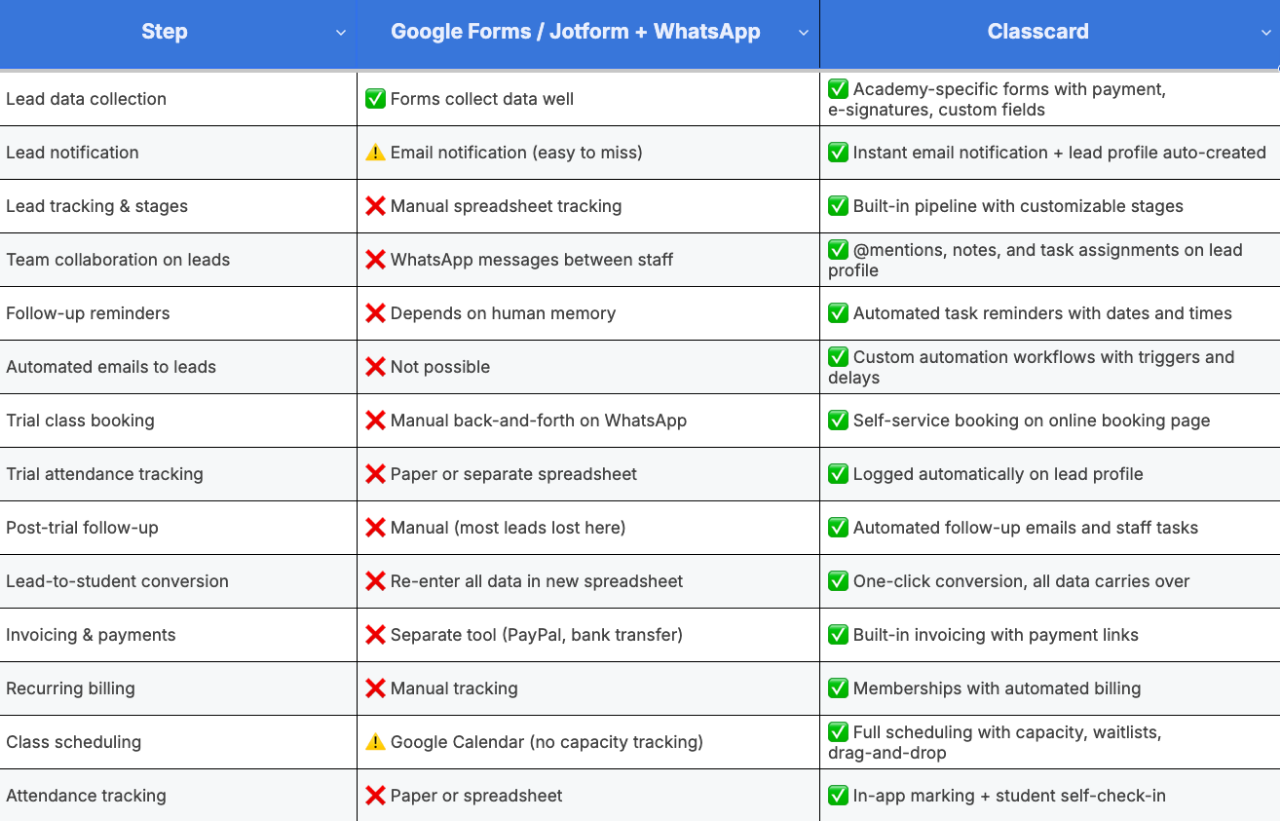
The pattern is clear: Google Forms and Jotform handle step one - data collection - reasonably well. But they were never designed to handle steps two through ten. Those steps are where the real operational work of running an academy lives, and they're exactly where the manual approach falls apart.
"But I Only Have 20 Students, Do I Really Need This?"
It's a fair question. When you have 15-20 students and one or two classes a week, Google Forms and a WhatsApp group genuinely work. The admin burden is manageable, and you can keep most of the details in your head.
But here's what typically happens as you grow:
At 30-40 students, the cracks start showing. You're spending 5-8 hours per week on admin - tracking payments, sending reminders, updating spreadsheets, responding to WhatsApp messages. You can feel leads slipping through the cracks but you're too busy to fix the process.
At 50-80 students, it becomes unsustainable. Multiple classes, multiple instructors, parents messaging at all hours, payments that are weeks overdue with no automated reminder to chase them. The spreadsheet that worked for 20 students now has 15 tabs and takes 30 minutes just to update after each day of classes.
At 100+ students, you're either hiring additional admin staff to manage the manual processes, or you've already switched to a system that automates them.
The academies that grow fastest are the ones that put the systems in place before they strictly "need" them, because the system creates the capacity for growth, rather than growth forcing you to scramble for a system.
"Can I Just Use Jotform for My Academy?"
Jotform is a solid form builder. It has beautiful templates, including ones specifically designed for dance studio registration, swim lesson signups, and class enrollment. If all you need is a form to collect student information, Jotform does that well. So does Google Forms, Typeform, and Microsoft Forms.
But here's the gap: a registration form handles the first 5 minutes of a student's journey at your academy. Classcard handles the next 5 years.
Jotform collects the data. Classcard builds the relationship. Jotform gives you a spreadsheet of responses. Classcard gives you a pipeline of leads with automated follow-ups, trial management, one-click conversion to students, connected scheduling, attendance tracking, billing, progress reports, and a branded app for your students and parents.
If you're running a one-off workshop or collecting RSVPs for an event, a form builder is the right tool. If you're running an ongoing academy with recurring students, multiple classes, and a continuous cycle of leads → trials → enrollments → retention, you need a system that connects all of those stages, not just the first one.
"How Is This Different From What We Do on WhatsApp?"
WhatsApp is great for quick, informal communication. But using it as your academy's operational backbone creates three problems:
Nothing is structured. Information about a student is scattered across dozens of chat threads - the inquiry message from January, the trial booking from February, the payment confirmation from March, the make-up class request from April. Finding anything requires scrolling through months of messages.
Nothing is automated. Every follow-up, every reminder, every scheduling confirmation is typed out manually by a staff member. At 20 students, that's manageable. At 80 students across 15 classes, it's a full-time job.
Nothing is visible to the team. If the staff member who handled a lead's inquiry is sick or on leave, no one else knows where that conversation stands. There's no shared view of which leads need follow-up, which trials are scheduled, or which payments are overdue.
Classcard doesn't replace WhatsApp for casual communication - you'll still use it to send a quick message or share a photo from class. But it replaces WhatsApp as your workflow engine. The structured tasks (follow-ups, reminders, scheduling, invoicing) move into a system where they're automated, trackable, and visible to the entire team. Classcard also integrates with WhatsApp, so you can connect the two where it makes sense.

What It Costs, And What It Saves
Let's talk numbers. Google Forms is free. Jotform starts at around $34/month for a paid plan. WhatsApp is free. So the manual approach feels "free."
But it's not. Consider what you're actually spending:
Staff time: If you or your staff spend 8-10 hours per week on manual admin (updating spreadsheets, sending WhatsApp reminders, chasing payments, scheduling make-ups, entering data), that's 35-40 hours per month. Even at a modest hourly rate, that's hundreds of dollars of productive time consumed by tasks that can be automated.
Lost leads: If 3 out of every 10 inquiries go cold because follow-up was too slow - and the average lifetime value of a student at your academy is $500-$2,000 per year - the cost of lost leads dwarfs any software subscription.
Late payments: Without automated payment reminders, academies typically have 15-25% of invoices overdue at any given time. Automated reminders alone can reduce this dramatically.
Classcard starts at $99/month and includes everything - scheduling, attendance, lead management, student management, invoicing, automation, online booking, the branded PWA, and your own dedicated account manager. There are no feature tiers where essential tools are locked behind expensive upgrades. You also get an annual pricing incentive: pay for 10 months and get 2 months free.
For most academies, the platform pays for itself within the first month, through time saved, leads converted, and payments collected on time.
Making the Switch: It's Easier Than You Think
If you're currently running on Google Forms and spreadsheets, here's the practical path to switching:
Week 1: Sign up for Classcard's 7-day free trial. Set up your lead form and student form with the fields that matter to your academy. Import your existing student data via CSV or Excel upload - Classcard supports bulk import.
Week 2: Set up your class schedule on the Classcard calendar. Configure your online booking page with your branding, class listings, and trial class options. Set up 2-3 basic automations (welcome email for new leads, post-trial follow-up, payment reminder).
Week 3: Go live. Share your new lead form link and online booking page. Start managing new inquiries through Classcard while maintaining your existing systems for current students.
Week 4: Once you're comfortable, migrate your current students fully into Classcard. Retire the spreadsheets. Keep your WhatsApp groups for casual communication, but let Classcard handle the operational workflows.
Most Classcard customers report being fully operational within days, not weeks. And every customer gets a dedicated account manager who walks them through setup and answers questions along the way.
Running your academy on Google Forms and WhatsApp worked to get you started. Classcard is how you scale without burning out. Try it free for 7 days — no credit card required, all features included from day one.
Frequently Asked Questions
Can I use Google Forms or Jotform with Classcard?
Yes. You can import data via CSV/Excel. However, Classcard’s native forms are purpose-built for academies, capturing specialized data like emergency contacts and waivers that sync directly into your management system.
Does Classcard replace WhatsApp?
No, it complements it. Use WhatsApp for casual chat, and Classcard for operations. Classcard automates reminders, follow-ups, and scheduling - tasks that usually get lost in chat threads - and offers a direct WhatsApp integration.
How is Classcard’s lead form different from Jotform?
Jotform is a static data collector. Classcard’s form is an automated entry point that instantly creates lead profiles, notifies your team, triggers follow-up workflows, and converts leads to students with one click.
What is the cost vs. Google Forms and Jotform?
While basic forms are cheaper or free, Classcard ($100/mo) replaces 5–6 separate tools. It typically pays for itself in its first month by saving 8–10+ hours of admin weekly and capturing leads that would otherwise go cold.
Is Classcard overkill for solo instructors?
At 15 students, manual work is manageable. However, implementing Classcard now builds the infrastructure for growth, preventing the "admin wall" when you scale and reach more students.
What types of academies use Classcard?
Over 3,000 class-based businesses, including dance, swim, martial arts, music, tutoring, and sports academies, use Classcard to manage recurring enrollments and student progression.